Siemens
💡Have feedback for this page? Let us know on the IA Forum.
The Siemens drivers in Ignition support basic connections to S7 devices. Ignition connects to these PLCs via TCP/IP using the S7 protocol. The available S7 device drivers are listed below by the module providing them:
Siemens Driver Module
- Siemens S7-300 Driver: Connects to S7-300 PLCs, supports absolute addressing only.
- Siemens S7-400 Driver: Connects to S7-400 PLCs, supports absolute addressing only.
- Siemens S7-1200 Driver: Connects to S7-1200 PLCs, supports absolute addressing only.
- Siemens S7-1500 Driver: Connects to S7-1500 PLCs, supports absolute addressing only.
Siemens Enhanced Driver Module
- Siemens Enhanced Driver: Connects to S7-300, S7-400, S7-1200, and S7-1500 devices. Supports browsing, symbolic access, and access to optimized data blocks when connected to S7-1200 and S7-1500 devices.
Deciding what driver is best for you depends on a few factors, such as your licensing requirements and setup since the Siemens Enhanced Driver module is not included on a Platform license. Additional considerations include your operating system and hardware. The Siemens Driver module is supported on Windows, Linux, Mac, and ARM. However, the Siemens Enhanced Driver module is only supported for Windows, Linux/x64, and Linux/ARM, but not Mac.
Considerations for 1200 and 1500 Devices
The requirements listed below apply when connecting to the S7-1200 and S7-1500 types, through either the Siemens drivers or the Siemens Enhanced driver options. The drivers are split into their own sections as the requirements will differ when using Symbolic addressing with the Siemens Enhanced driver.
Siemens Driver
The following list is applicable to the S7-1200 and S7-1500 driver connections available through the Siemens Driver module.
-
Only global DBs can be accessed.
-
Reading and writing is not supported for timer (TM) and counter (CT) areas.
-
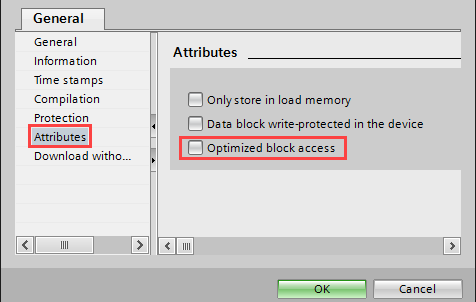
The Optimized block access attribute option must be turned off.
-
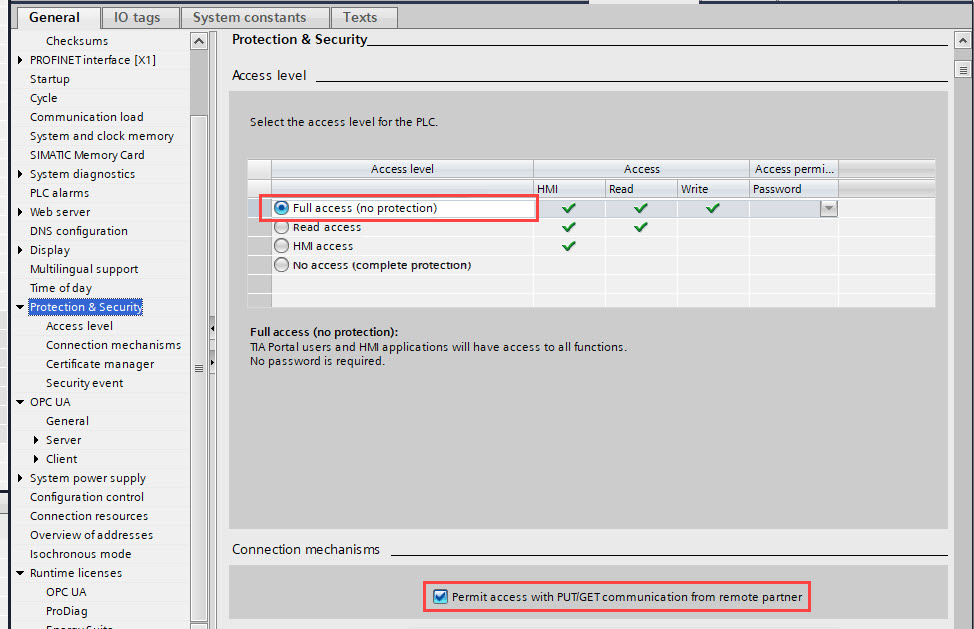
When configuring the Protection & Security settings, make sure the Full access (no protection) and Permit access with PUT/GET communication options are selected.
- This change may require the hardware configuration to be recompiled and downloaded. Additionally, disabling "optimized access" for the data block(s) you are attempting to read may also improve the reliability of tag reads.
Additionally, some S7-1200 and S7-1500 devices have an onboard OPC UA server that can be enabled to connect over the OPC UA server instead of using the Siemens driver. OPC UA allows you to browse tags, instead of addressing each tag manually.
Siemens Enhanced Driver
The following requirements are applicable to the Siemens Enhanced driver when used to connect to an S7-1200 or S7-1500 device.
-
Only global DBs can be accessed when Absolute addressing is selected.
-
Reading and writing is not supported for timer (TM) and counter (CT) areas when Absolute addressing is selected. For Symbolic addressing, you still cannot explicitly reference an address (such as T0 or C0), but reading and writing is possible if a tag within a tag table exists in one of those areas.
-
The Optimized block access attribute option must be turned off when Absolute addressing is selected.
-
When configuring the Protection & Security settings, make sure the Full access (no protection) and Permit access with PUT/GET communication options are selected when using Absolute addressing. These options are not necessary when using Symbolic addressing, as only read access is required to read or browse. Write access is still required to write.
- This change may require the hardware configuration to be recompiled and downloaded. Additionally, disabling "optimized access" for the data block(s) you are attempting to read may also improve the reliability of tag reads.
Refer to the Siemens Enhanced Driver and Siemens Drivers pages for more information on driver configuration and connection. The Siemens Drivers page covers addressing and connection settings for the S7-300, S7-400, S7-1200, and S7-1500 drivers.