Changing the Theme from a Session
A theme can be set by directly writing to session.props.theme property. The property is writable from a session, so you can easily utilize component bindings in such a way that users can change the theme directly from the session. In this example, we will create a Dropdown component, and configure a component binding that allows the dropdown to change the theme in the current session.
-
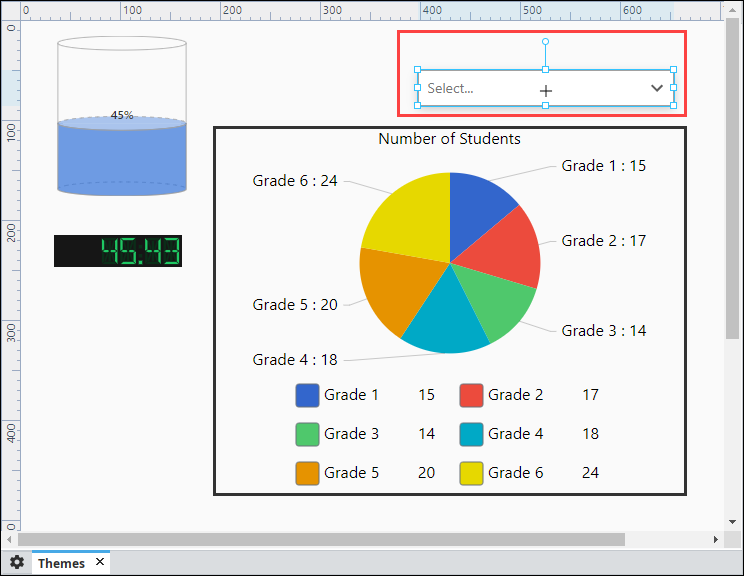
Open a view in the Designer that contains a few components and drag in a Dropdown component.
-
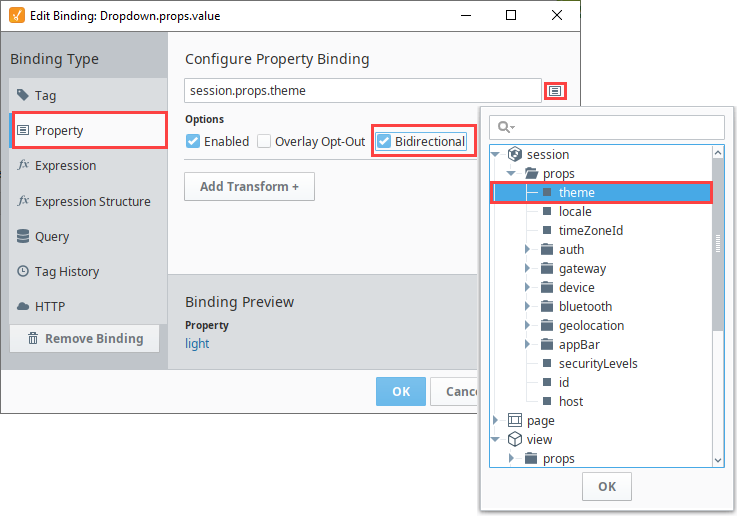
With the Dropdown component selected, click on the Binding
 icon to create a property binding on the value property
-
The Edit Binding window will open. The theme property is a session property. Click on the Property
 icon and expand session > props, and select theme. Click OK.
 -
Check Bidirectional and click OK to save your property binding.
-
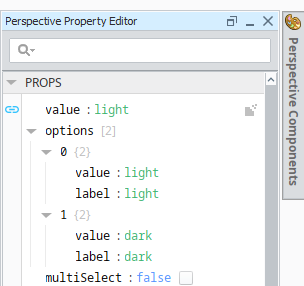
With the Dropdown component still selected, locate the props.options property in the Property Editor.
Paste the following JSON values onto the options property of the Dropdown component.
    [
        {
            "value": "light",
            "label": "light"
        },
        {
            "value": "dark",
            "label": "dark"
        }
    ]
-
Save your project and open your view in a Session or enable Preview Mode in the Designer.
-
From the Dropdown component, select a desired theme (i.e., light).

The selected theme will now be applied for the entire Perspective Session.