Remote Gateways and Connections Details
Ignition's Gateway Network system shares information across Gateways using threads to send and receive information. For example, if you have a Remote Tag Provider configured between Gateway A and Gateway B, messages containing live tag information will be sent between these two Gateways using threads. Similarly, a Remote Historian will send/receive messages with historical tag data between Gateway A and Gateway B using this same set of threads. Each Ignition subsystem that uses the Gateway Network will utilize these threads in some way.
Ignition's Gateway Network also has a queue associated with each Ignition subsystem. These queues allow for Ignition to have a way to prioritize which subsystem should have access to a send or receive thread. Prioritization here is especially important because if all send threads are in use, new messages cannot be sent between two Gateways.
This page describes how to view and configure these connection and remote Gateway details from the Network > Gateway Network > Connections page on the Gateway.
See the Gateway Network page for additional settings that will help monitor Gateway interactions, and the Gateway Network Connections page for more information on your outgoing and incoming connections.
Connections
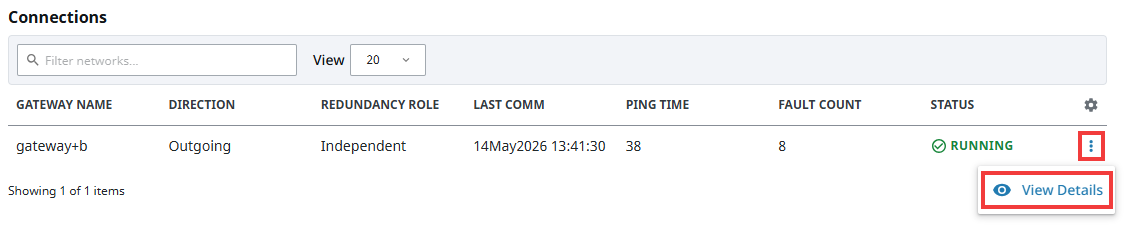
Beyond the overview of your network connections and remote Gateways, you can see more in-depth information about your connections. Expanding the three dots menu and clicking on the View Details button will bring up detailed information about the selected connection.
Several metrics are shown when first entering the Connections Details page:
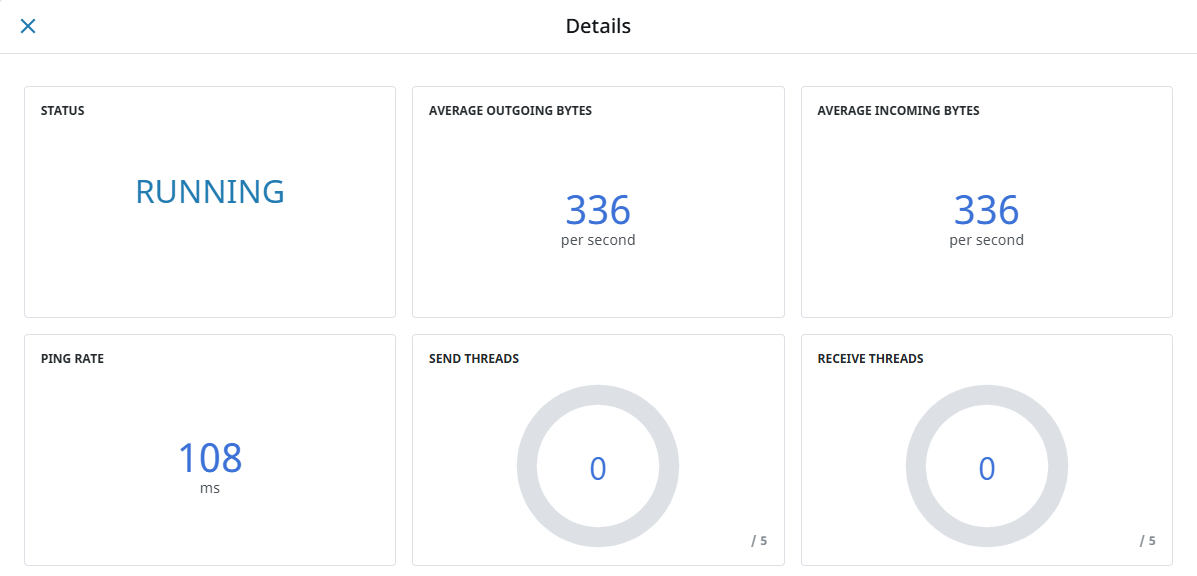
The tables and sections below list the various metrics measured within the Connections View Details, by category:
| Attribute | Description |
|---|---|
| Status | Current state of the Gateway Network connection. |
| Average Outgoing Bytes | Average bytes of data going from the local Gateway to the remote Gateway per second. |
| Average Incoming Bytes | Average bytes of data going from the remote Gateway to the local Gateway per second. |
| Ping Rate | Reaction time of Gateway connection for how quickly it receives a response after sending a request. |
| Send Threads | A thread that is used by the Gateway Network to upload messages from one Gateway to another. |
| Receive Threads | A thread that is used by the Gateway Network to download messages from one Gateway to another. |
Long Running Outgoing Tasks

| Attribute | Description |
|---|---|
| ID | The Gateway ID that the task originates from. |
| Task Name | Name of the task that is using a thread. |
| Target Gateway | The Gateway the task is being sent to. |
| Queue | The Ignition subsystem queue that dispatched this task. |
| Duration Secs | How long in seconds it takes for a task to be performed. |
Long Running Incoming Tasks

| Attribute | Description |
|---|---|
| ID | The Gateway ID that the task originates from. |
| Task Name | Name of the task that is using a thread. |
| Target Gateway | The Gateway the task is being sent to. |
| Duration Secs | How long in seconds it takes for a task to be performed. |
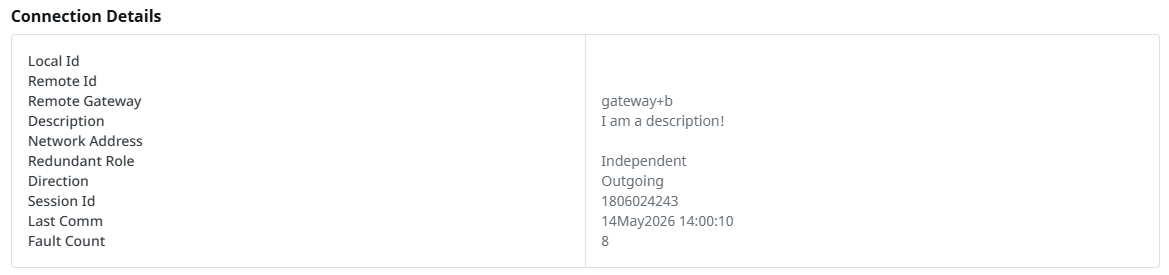
Connection Details
| Attribute | Description |
|---|---|
| Local Id | ID of the local Gateway. |
| Remote Id | ID of the remote Gateway. |
| Remote Gateway | Name of the Gateway on the Gateway Network. |
| Description | A description of the Gateway Network connection. |
| Network Address | Physical address used to communicate with all devices on the Gateway Network. |
| Redundant Role | The redundancy role of the Gateway. Can either be Independent, Backup, or Master. |
| Direction | The direction of the Gateway Network connection. Can either be Incoming or Outgoing. |
| Session Id | Gateway connection session ID number. Connected Gateways use the same session ID on both Gateways. |
| Last Comm | The time of the last communication with the Gateway. |
| Fault Count | Number of times the connection has faulted since the Gateway has been started. |
Connection Events

| Attribute | Description |
|---|---|
| Severity | The level of the recorded connection event. |
| Time | The date and time during which the connection event occurred. |
| Event | The description of the connection event that occurred. |
Connections Log Activity
You can filter out the loggers that show up in this table using the Min Level dropdown. This does not change the underlying log level.

| Attribute | Description |
|---|---|
| Logger | The specific logger creating log entries, along with the log level. |
| Time | The date and time during which the logger logged a message. |
| Message | A description of the issue or information that set the logger off. |
Remote Gateways
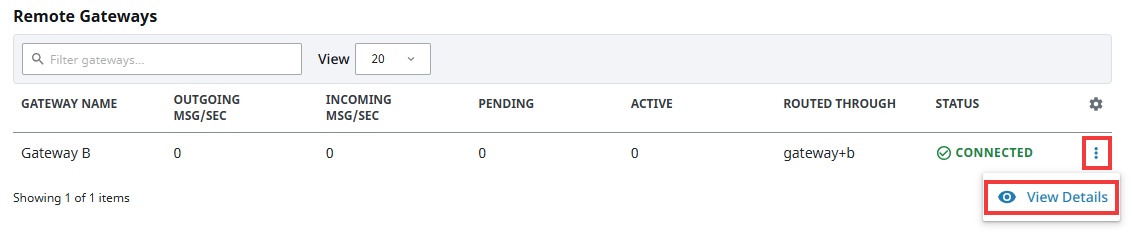
Similar to Gateway Network connections, you can view more in-depth information about your remote Gateways. Expanding the three dots menu and clicking on the View Details button will bring up detailed information about the selected remote Gateway.
Outgoing Queues
The Outgoing Queues section displays metrics for different waiting queues Ignition uses to send and receive data. Tasks within each queue are also shown by the number of pending and active tasks. A pending task is a task that has not yet been dispatched to the Gateway Network thread pool. An active task is a task that is being processed by the Gateway Network thread pool and will show up under the Connection Details page as either an outgoing or incoming task.
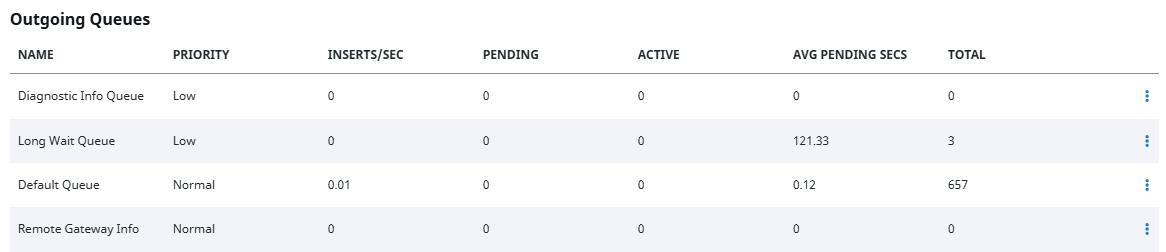
| Attribute | Description |
|---|---|
| Name | Name of the queue. |
| Priority | Level of priority for a queue. |
| Inserts/Sec | Rate of task inserts per second for a queue |
| Pending | Number of pending tasks in a queue that have not yet been dispatched to a Send/Receive thread. |
| Active | Number of messages being actively processed by the Gateway Network connection. |
| Avg Pending Secs | Average number of seconds that a task has been pending in a queue. |
| Total | Total number of tasks executed from this queue. |
Each individual queue can be paused and resumed, or cleared entirely by selecting the three dots menu for the intended queue. Pausing a queue means no new tasks will be allowed to be inserted into the paused queue. Clearing a queue means that all pending tasks will be purged. These actions are designed to help the user deal with a possibly overloaded Gateway Network connection due to a specific subsystem flooding the queue with more tasks than the connection can handle. Note that neither of these actions will have any effect on active tasks, as they have already been dispatched to the Gateway Network connection and cannot be cancelled.

Outgoing and Incoming Tasks Statistics
The Outgoing and Incoming Task Statistics section shows individual tasks that have been processed by the Gateway Network connection.


| Outgoing and Incoming Tasks Attributes | Description |
|---|---|
| Name | Name of a task. |
| Description | Description for a task. |
| Queue | Queue invoking a task. Used for Outgoing Tasks only. |
| Invocation/Sec | Rate at which a task is invoked per second. |
| Total | Number of times the task has been executed in total. |
Remote Gateways Log Activity
You can filter out the loggers that show up in this table using the Min Level dropdown. This does not change the underlying log level.

| Attribute | Description |
|---|---|
| Logger | The specific logger creating log entries, along with the log level. |
| Time | The date and time during which the logger logged a message. |
| Message | A description of the issue or information that set the logger off. |