SECS/GEM Equipment Connections
Connection Types
Equipment connections can be configured using either Ethernet or serial communication, depending on what the equipment supports. Ethernet connections use the HSMS protocol (SEMI E37) over TCP/IP and are the preferred option due to higher performance and reliability. Serial connections use the SECS-I protocol (SEMI E4) over an RS-232 connection and require the equipment to be directly connected to the Ignition Gateway server.
Equipment Connection Properties
When setting up an equipment connection through either ethernet or serial, there are various properties that can be configured. For more details on adding a connection, see the Creating an Equipment Connection example.
Common Properties
| Property Name | Description |
|---|---|
| Equipment Name | The name of the equipment connection. |
| Equipment Description | A description of the equipment connection. |
| Enabled | Enables or disables communication between the Gateway and the equipment. Default is TRUE. |
| Device ID | A unique integer identifier defined by the equipment. Default is 0. |
| Database Connection | The database connection used for configuration data and message auditing. |
| Database Table Prefix | An optional prefix added to database table names to distinguish records for different equipment connections. |
| SECS Definition Language (SDL) File | The SDL file used to validate SECS messages. If not specified, the default messages.sdl file is used. |
| T3 Reply Timeout | The number of seconds to wait for an expected SECS reply message. Default is 45. |
Ethernet/HSMS Connection Properties
These properties apply only to equipment connections that use the Ethernet/HSMS connection type.
| Property Name | Description |
|---|---|
| Active IP Address | IP Address of the equipment to connect to when in Active mode. Default is localhost. |
| Active Port | The Port number of the equipment to connect to when in Active mode, which must match the port number used to create the Simulator. Default is 5000. |
| Passive IP Address | IP Address of the equipment to connect to when in Passive mode. Default is localhost. |
| Passive Port | The Port number that an Equipment will connect to if the SECS/GEM module is in passive mode. Default is 5000. |
| Connection Mode | The method used to connect to Equipment.
|
| T5 Connect Separation Timeout | The number of seconds which must elapse between successive attempts to connect to the equipment after disconnection. Default is 10. |
| T6 Control Transaction Timeout | The number of seconds which a control transaction (such as LinkTest or Select) may remain open before it is considered a communications failure. Default is 5. |
| T7 Not Selected Timeout | The number of seconds which a TCP/IP connection can remain in NOT SELECTED state (i.e. no HSMS activity) before it is considered a communications failure. This timeout is only used for Passive Connection Mode. Default is 10. |
| T8 Network Intercharacter Timeout | The maximum number of seconds between successive bytes of a single HSMS message before it is considered a communications failure. This applies to HSMS messages received from the equipment. Default is 5. |
| Keep Alive Timeout | The number of seconds interval for sending LinkTest control messages for testing a connection. Automatically reconnects if the test fails. A value of 0 will disable it. Default is 300. |
Serial/SECS-I Connection Properties
These properties apply only to equipment connections that use the Serial/SECS-I connection type.
| Property Name | Description |
|---|---|
| Serial Port Name | The name of the serial port. Default is COM1. |
| Data Bit Rate | The bit rate of data that is being sent and received. Default is BR_9600. Possible values are:
|
| T1 Inter-Character Timeout | The maximum number of seconds allowed for interruptions between characters being sent. Default is 0.5. |
| T2 Protocol Timeout | The maximum number of seconds for a lack of protocol response. Default is 10. |
| T4 Inter-Block Timeout | The maximum number of seconds allowed for interruptions in multi-block messages. Default is 45. |
| Retry Limit | The maximum number of send retries allowed. Default is 3. |
Database Tables
SECS/GEM creates several database tables to store equipment connection information, message history, and errors. These tables support auditing and diagnostics and are not required for normal module operation.
The tables created for an equipment connection depend on the selected database connection and optional table prefix.
Ignition does not perform automatic maintenance on SECS/GEM database tables. Some tables can grow large over time, so it's recommended that users manage retention, pruning, or partitioning as needed.
SECSGEM_EquipmentInfo
The SECSGEM_EquipmentInfo table stores summary information for all equipment connections that use the same database connection. This table is created once per database connection and does not use a table prefix.
Each row represents a single equipment connection.
| Column Name | Datatype | Description |
|---|---|---|
| Equipment | String | The name of the equipment connection. |
| Prefix | String | The table prefix used by the equipment connection. |
| Status | String | The current status of the equipment connection. |
| SDL File | String | The SDL file associated with the equipment connection. If none is uploaded, the default messages.sdl file is used. |
Messages
The Messages table stores SECS messages that are sent or received by an equipment connection. If a table prefix is specified, it is included in the table name. Multiple equipment connections can share the same prefix and write to the same Messages table.
prefixMessages
| Column Name | Datatype | Description |
|---|---|---|
| ID | Auto-incrementing integer | The unique row identifier. |
| Equipment | String | The name of the equipment connection. |
| StreamFunction | String | The SECS Stream and Function. For example, S1F1. |
| Direction | String | Indicates whether the message was sent or received. |
| RequestResponse | String | Indicates whether the message is a request or a response. |
| CommonID | String | An identifier used to associate related messages. |
| TxID | Integer | The transaction identifier for the message. |
| Reply | Integer | Indicates whether the message expects a reply. |
| Message | String | The SECS message represented as JSON. |
| TimeSentReceived | DateTime | The date and time the message was sent or received. |
Errors
The Errors table records errors that occur during SECS/GEM communication. If a table prefix is specified, it is included in the table name. Multiple equipment connections can write to the same Errors table when they share a prefix.
prefixErrors
| Column Name | Datatype | Description |
|---|---|---|
| ID | Auto-incrementing integer | The unique row identifier. |
| Equipment | String | The name of the equipment connection. |
| StreamFunction | String | The SECS Stream and Function associated with the error, if applicable. |
| ErrorType | String | The category of error, such as connection, timeout, or validation errors. |
| Error | String | The error message. |
| Time | DateTime | The date and time the error occurred. |
SECS/GEM Equipment Page
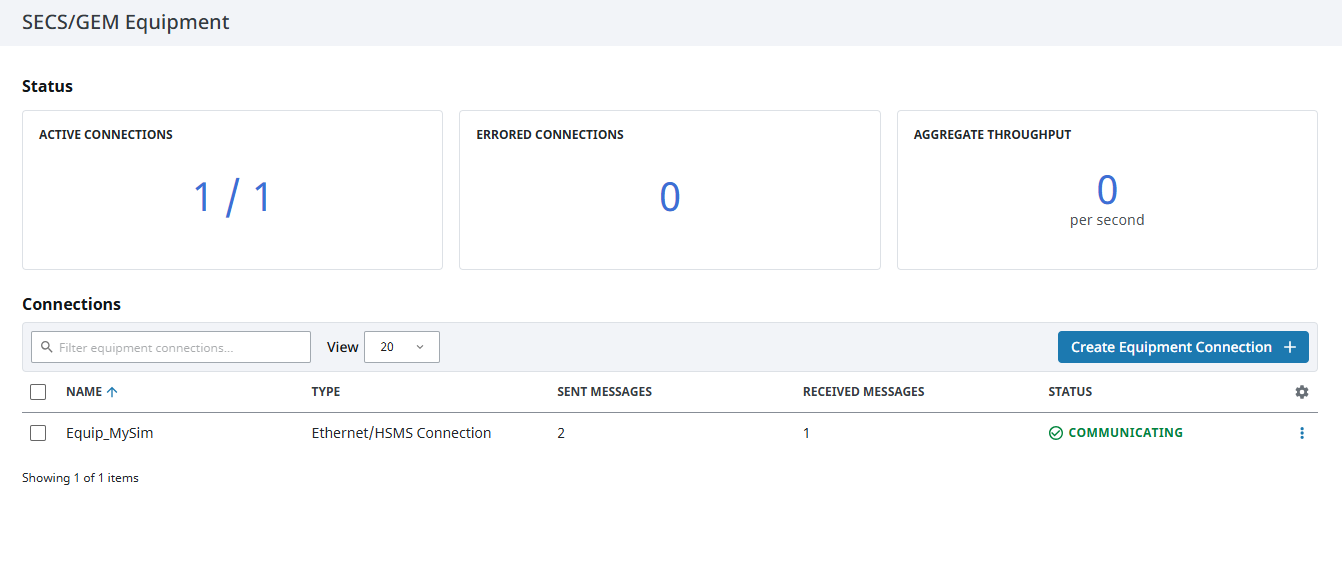
The SECS/GEM Equipment page displays all configured equipment connections, their current status, and message activity.
| Attribute | Description |
|---|---|
| Active Connections | The total number of active equipment connections. |
| Errored Connections | The total number of errored equipment connections. |
| Aggregate Throughput | The combined message throughput across all connections. |
| Name | The equipment connection name. |
| Type | The type of equipment connections, either Ethernet/HSMS Connection or Serial/SECS-I Connection. |
| Sent Messages | The total number of messages sent to the equipment. |
| Received Messages | The total number of messages received from the equipment. |
| Status | The current connection status. If a connection becomes faulted or disconnected, its status is shown as Not Connected. |
SECS/GEM Equipment Details
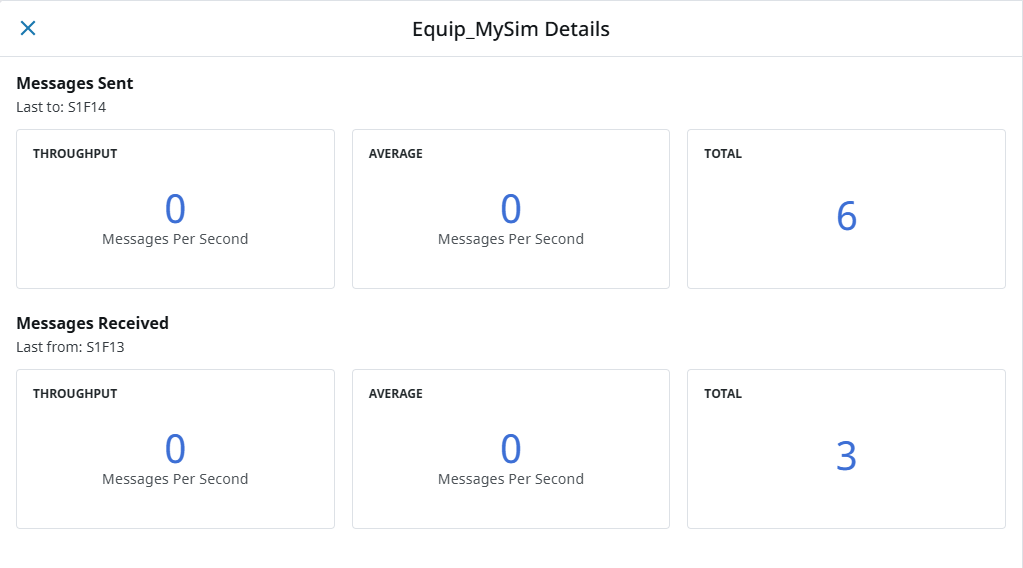
Clicking the three dots menu to the right of an equipment connection and selecting View Details will show more detailed information for that particular piece of equipment.
Messages Sent
| Attribute | Description |
|---|---|
| Throughput | The messages per second the system is currently sending. |
| Average | The average messages sent per second from when the equipment was first enabled. |
| Total | The total messages sent. |
Messages Received
| Attribute | Description |
|---|---|
| Throughput | The messages per second the system is currently receiving. |
| Average | The average messages received per second from when the equipment was first enabled. |
| Total | The total messages received. |