Perspective - View Object
This is the view itself. A view has properties that control the view size, defines how tags are dropped into a view, and settings for loading client views. The view properties are the same for each container type. View properties are displayed in the Perspective Property Editor when you click on the view in the Project Browser.
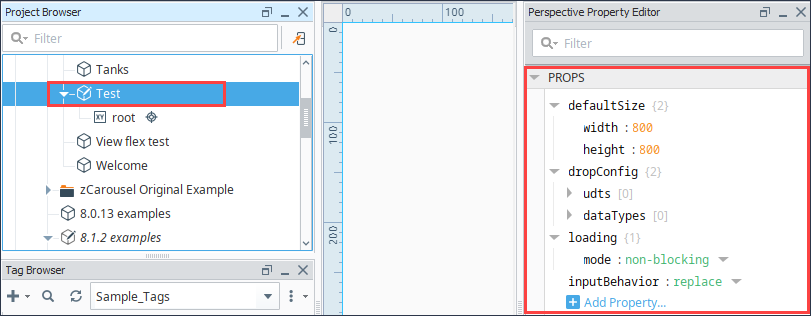
Properties
Most Properties have binding options. For more information on Bindings, see Types of Bindings in Perspective. This section only documents the Props Category of properties. The other Categories are described on the Perspective Component Properties page.
| Name | Description | Property Type |
|---|---|---|
| defaultSize | Default size of the container.
| value: numeric |
| dropConfig | Provides an opportunity to automatically create an instance of this view via tag drop. Click to see dropConfig properties. See the Drop Configuration page for more information. | object |
| loading | Options for loading the view.
| object |
| inputBehavior | Controls whether the internal properties of object-typed input and bi-directional parameters are merged with existing default values or whether the object-typed parameter should be strictly replaced with the supplied values.If "replace" is selected, and an object-typed parameter is supplied which does not contain a key for a default value, then that default value will not be used. Default is replace. Refer to the inputBehavior Examples for more details. | object |
dropConfig Properties
| Name | Description | Property Type |
|---|---|---|
| udts | These settings allow for the automatic creation of this view when a UDT instance is dragged onto another view, using _this_ view to represent the UDT. A parameter is passed into the view, allowing the view to reference the UDT.
| object |
| dataTypes | These settings allow for the automatic creation of this view when a standard tag is dragged onto another view. A parameter is passed into the view, allowing the view to reference the tag.
| object |
inputBehavior Examples
Defined “default” parameter:
myObject: {
    myParamOne: "One",
    myParamTwo: "Two"
}
Supplied parameter from Embedding Component:
myObject: {
    myParamOne: "1",
    myParamThree: "3"
}
If “merge” is selected:
myObject: {
    myParamOne: "1",
    myParamTwo: "Two",
    myParamThree: "3"
}
If “replace” is selected:
myObject: {
    myParamOne: "1",
    myParamThree: "3"
}
Note that there is no value for myParamTwo, so any references to this property will fault.
Component Scripts and Events
Further component interaction and functionality can be configured for all components through scripting and event actions. Right-click on the component or select Components from the Designer menubar to access the configuration popups for both of these options:
- Configure Events: Accesses the Event Configuration popup where you can configure actions to run in response to events to make the component dynamic. The Events Configurations page shows how to configure events and actions on a Perspective component.
- Configure Scripts: Accesses the Script Configuration popup where custom methods and message handlers can be added. The Scripting in Perspective section details scripting fundamentals, creating custom methods, and using message handlers.